

TL;DR: Adaptive visual recognition makes UI automation more resilient by recognizing elements through visible context rather than fragile technical selectors or fixed image templates.
UI automation has a difficult reputation in software development—and for good reason.
Compared to API or component-level tests, UI tests are slower, more brittle, and significantly more expensive to maintain. But here’s the real issue: when a test fails, it’s often unclear whether you’ve found a genuine product defect or simply hit a renamed CSS class, a moved component, or a refactored DOM structure. That uncertainty erodes trust in your entire test suite.
Yet UI automation remains essential in specific scenarios:
The goal isn’t to move every test to the UI layer. Unit, component, and API tests remain the right choice for most validation. The goal is to make UI automation resilient when it’s genuinely necessary.
Before discussing solutions, it’s important to clarify what we mean by UI automation. This isn’t primarily about testing visual design validating spacing, colors, or pixel-perfect rendering. Those checks serve a purpose, but they’re a different concern.
This is about testing via the UI: using the user interface as the interaction channel to execute workflows and validate business outcomes.
The critical question isn’t whether a button has exactly the intended styling. It’s whether a user can successfully complete a business process—enter their details, select an option, submit a request, and receive the expected result.
The UI, in this context, is often not the isolated object under test. It’s the access path to business functionality.
The core problem is brittleness and it’s rooted in technical coupling.
Modern user interfaces change continuously. DOM IDs are renamed, component structures are refactored, styles are updated, and layouts shift across responsive breakpoints or new releases. Traditional UI automation depends on these exact technical details. It may rely on object IDs, CSS selectors, XPath expressions, DOM hierarchy, or fixed image templates.
When those details change, the test breaks—even though users see the same control and can complete the same workflow.
This creates a frustrating class of failures: the application remains functional, but the automation no longer knows how to find or interact with the element. The result is false alarms, unnecessary maintenance effort, and reduced confidence in the test suite.
The underlying issue is clear: tests break because automation depends on technical representation, not on visible intent.
A common response to brittle automation is self-healing: when a locator fails, the framework attempts to find an alternative match, continue execution, or update the locator dynamically.
Self-healing can reduce manual repair work and speed up recovery after UI changes.
However, it’s important to understand its limitations. Self-healing begins after failure has already occurred—the original locator breaks first, then recovery is attempted. In most cases, recovery still operates within the same technical layer: identifiers, structural metadata, object properties, or selectors.
This means self-healing can reduce the pain of locator failures, but it doesn’t fundamentally eliminate brittleness. It’s primarily reactive rather than preventive. There’s also the risk that an alternative match is not the intended element, leading to false positives.
If selectors are brittle, the natural question becomes: why not automate visually instead?
Image-based testing has existed for years. However, traditional image matching relies on exact or near-exact template matching: the automation compares a stored screenshot or image fragment with the current screen.
This approach may survive an ID change or DOM refactor. But it becomes fragile when visual appearance changes—through scaling, theme adjustments, anti-aliasing, minor restyling, different screen resolutions, or responsive layout shifts.
Simply replacing selectors with screenshot templates doesn’t solve the resilience problem. It relocates the fragility to a different layer. The meaningful distinction is not selector-based versus visual automation. It’s exact matching versus adaptive recognition.
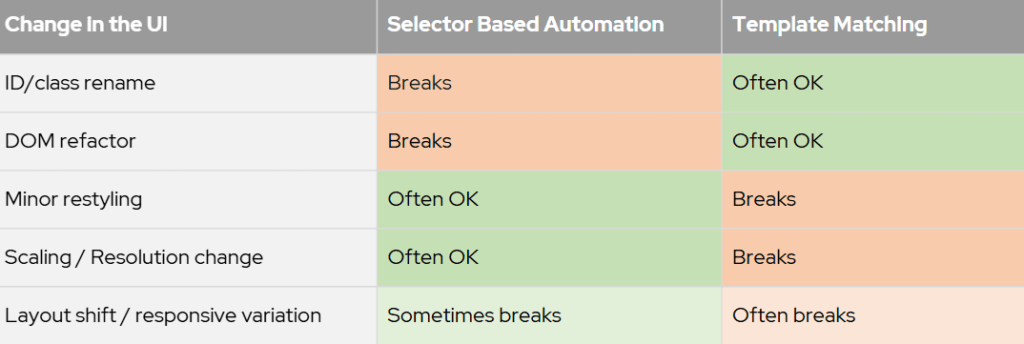
Exact Matching vs. Adaptive Recognition: The Key Distinction in Resilient UI Automation
Adaptive visual recognition identifies UI elements through learned visual characteristics and their surrounding context.
It does not rely on technical identifiers such as IDs, CSS classes, object paths, or DOM structure. At the same time, it does not depend on exact screenshot templates requiring near-perfect pixel similarity.
Instead, lightweight machine-learning models recognize controls based on visible characteristics—shape, iconography, and structural appearance. They also use contextual signals: nearby labels, relative position, grouping, and an element’s role within a workflow.
The identification model therefore shifts from technical representation to visible intent.
Two screens may look different because of a redesigned layout, updated styling, responsive variation, or changed technical implementation. From a business perspective, however, they can still represent the same workflow. A user may still need to enter customer details, select an option, trigger a calculation, and validate the result even if controls have moved or look different from a previous version.
This is where adaptive visual recognition helps: it identifies elements through visible features and context, rather than exact screenshot identity or hidden technical identifiers.
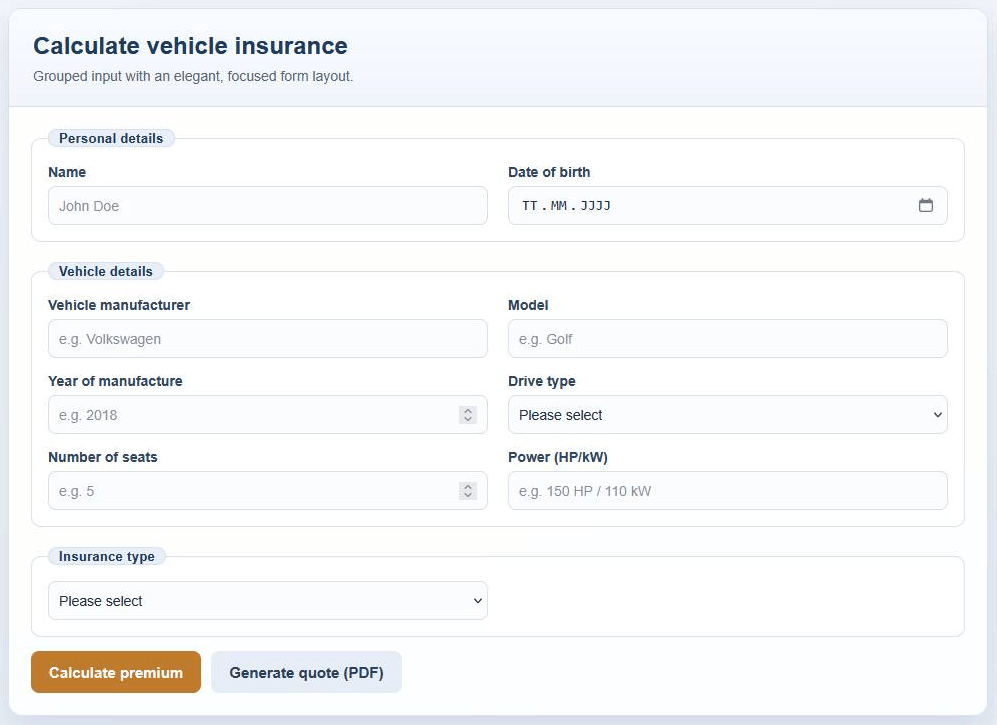
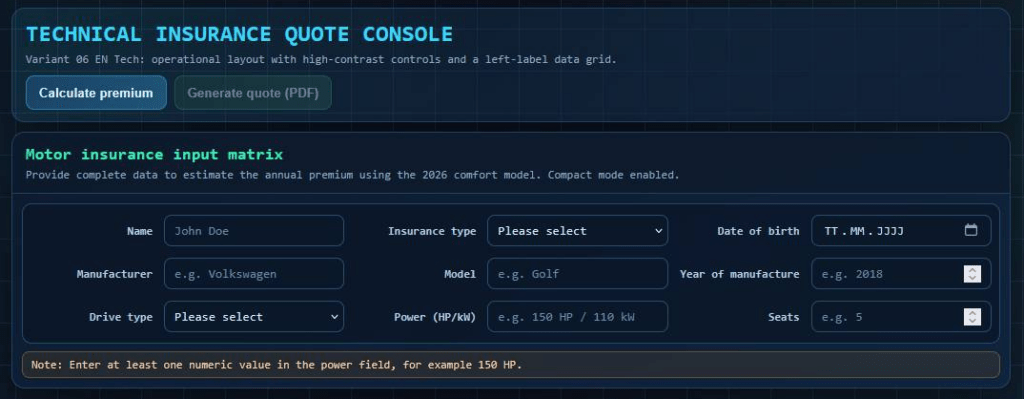
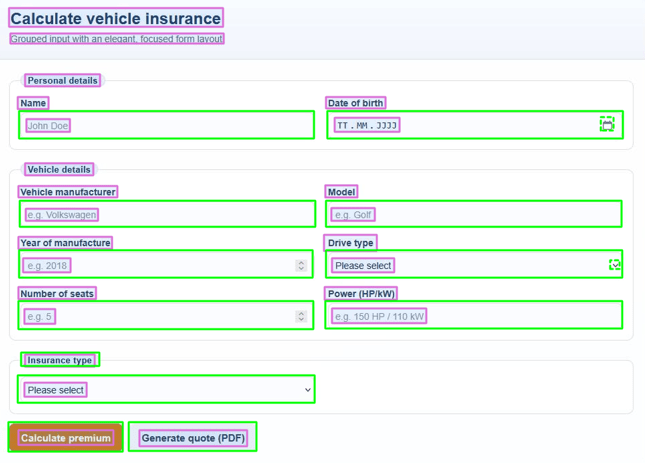
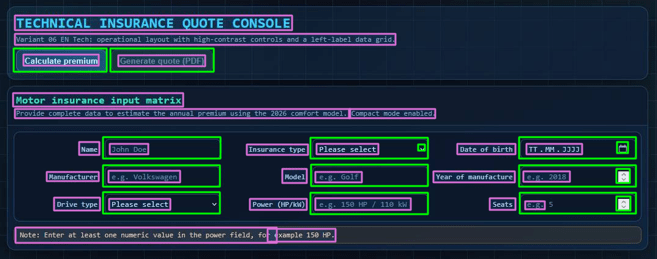
Same business workflow – Different visual implementation
Adaptive visual recognition doesn’t eliminate every challenge of UI-level automation. Testing through the UI remains slower than lower-level testing. Stable screen states, synchronization, and interactability still matter. Animations, overlays, delayed loading, and ambiguous controls can still present difficulties.
But the nature of debugging changes significantly.
Instead of investigating locator internals, object trees, selectors, or hidden properties, teams focus more directly on what was visible, recognizable, and actionable from the user’s perspective.
This supports a useful principle: a failure should matter most when it would also create a problem for the user.
A visual approach intentionally avoids dependency on hidden text, metadata, and internal implementation details. This makes automation more resilient to technical change, but it also means that truncated, obscured, or partially visible content becomes significant. If automation cannot reliably identify or operate an element because it’s not clearly visible, this may also indicate a genuine usability issue for the human user.
The goal is not silence or zero failures. It is better signal: fewer failures caused solely by technical implementation changes, and more failures that relate to visible interaction and real user impact.
The operational impact extends beyond reduced test failures.
With traditional UI automation, significant effort goes into technical re-identification: repairing locators, tracing object paths, and adapting to structural changes that may not matter from a user perspective. This creates a noisy failure profile. Teams spend cycles investigating problems that exist for the automation but not necessarily for the business workflow.
With a more visually anchored approach, effort shifts. Less time is spent maintaining technical mappings, while failures are more likely to correspond to visible interaction problems or genuine interface ambiguity.
The benefit is not merely fewer interruptions. It’s that the interruptions that remain become more meaningful—and more actionable.
Operationally, this makes UI automation easier to justify and more sustainable in environments where interface change is normal—which describes most modern software teams.
You are currently viewing a placeholder content from YouTube. To access the actual content, click the button below. Please note that doing so will share data with third-party providers.
More InformationTraditional UI automation becomes fragile when it relies too heavily on selectors, DOM structures, object IDs, or fixed image templates.
Adaptive automation by visual recognition offers a more user-centered approach. It uses the visible interface as the interaction surface and identifies elements based on their visible role and context.
It does not replace every technical automation method. APIs, stable identifiers, and test hooks remain valuable where they are available and appropriate.
But where UI interaction is unavoidable and traditional automation creates excessive maintenance overhead, adaptive visual recognition can help teams validate business workflows with less unnecessary technical coupling — and with a stronger connection to the actual user experience.
Schedule a demo to see adaptive automation by visual recognition in action.
You are currently viewing a placeholder content from Vimeo. To access the actual content, click the button below. Please note that doing so will share data with third-party providers.
More InformationYou are currently viewing a placeholder content from YouTube. To access the actual content, click the button below. Please note that doing so will share data with third-party providers.
More InformationYou need to load content from reCAPTCHA to submit the form. Please note that doing so will share data with third-party providers.
More Information